

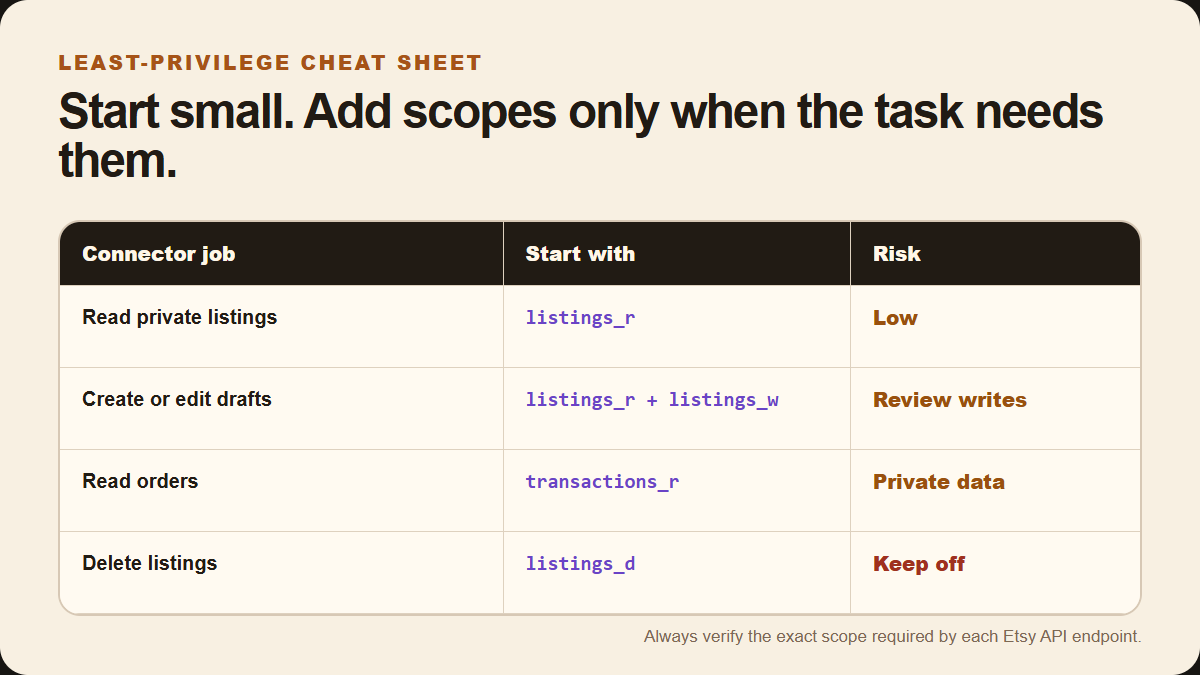
For a basic Claude Etsy listing connector, start with listings_r. Add listings_w only when Claude must create or edit listings. Do not request listings_d by default. That small scope set follows the safest rule for automation: give the connector only the access its current job requires.
Read-only review: listings_r. Create or edit drafts: listings_r listings_w. Order reporting: add transactions_r. Keep delete access and unrelated customer data out of the first version.
This guide is for sellers and builders connecting Claude to an Etsy app or connector. If you still need the basic setup, begin with the Krafie and Claude MCP connection guide.
The short answer: use least privilege
Etsy calls API permissions scopes. Each scope controls a category of data or action. The ending helps you read it:
_rmeans read access._wmeans write or update access._dmeans delete access.
The safest connector is not the one with the most scopes. It is the one with the smallest set that still completes the intended workflow. Etsy's own documentation recommends tailoring scope requests because users are less likely to authorize apps asking for more access than they need.
Recommended Etsy scopes by connector job
| What Claude needs to do | Suggested starting scopes | What to avoid |
|---|---|---|
| Review your inactive or expired listings | listings_r | No write or delete scope |
| Create or edit listing drafts | listings_r listings_w | Do not add delete access |
| Read private shop settings or sections | shops_r | Do not request shops_w unless editing is required |
| Update shop description or sections | shops_r shops_w | Keep this separate from listing work when possible |
| Build an order dashboard | transactions_r | Avoid write access and unrelated profile data |
| Update sales or fulfillment data | transactions_r transactions_w | Require human approval for every write |
These are sensible starting sets, not a substitute for endpoint documentation. Etsy notes that every API endpoint can require zero, one, or several scopes. Check the exact endpoint before requesting access.
When to use each common Etsy scope
listings_r: the safest place to start
This scope lets an app read a member's inactive and expired listings. It is useful when Claude needs to audit drafts, compare titles, find missing tags, or prepare recommendations without changing the shop.
Start here during testing. A read-only connector can still do useful work while giving you time to verify its decisions.
listings_w: use for drafts and edits
Add this scope when Claude must create or edit listings. Etsy lists listings_w as the scope required to create a listing.
Write access is where mistakes become visible to customers, so put guardrails around it:
- Create drafts first instead of publishing immediately.
- Show the proposed title, description, price, and files before saving.
- Require approval before changing an existing live listing.
- Keep a simple log of every edited listing ID and field.
listings_d: normally leave it off
This scope allows the app to delete a member's listings. Most research, SEO, draft-generation, and publishing workflows do not need it.
Do not include delete access “just in case.” If a future feature truly needs deletion, make it a separate tool with a clear confirmation step. Until then, keep listings_d out of the authorization request.
transactions_r and transactions_w: protect order data
Use transactions_r for sales reporting, order summaries, or fulfillment dashboards. Add transactions_w only if the connector must update sales data.
Order data is more sensitive than public listing information. Do not request email_r, address_r, billing_r, or profile scopes merely because they exist. Add a customer-data scope only when a specific, documented feature cannot work without it.
Claude permissions are separate from Etsy scopes
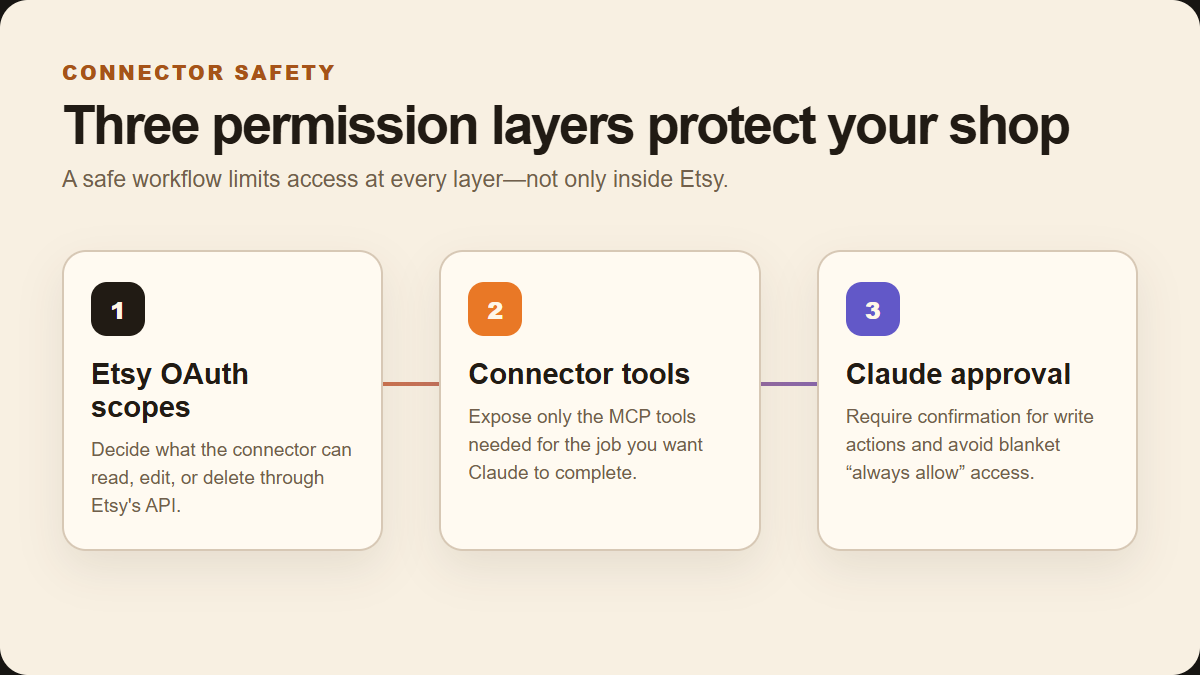
Etsy OAuth decides what the connector can do through Etsy's API. Claude has another control layer: which connector tools are enabled and whether an action needs approval.
Anthropic's connector guidance recommends enabling only relevant tools, reviewing requested permissions, and being especially careful with tools that write or delete data. It also warns that an “allow always” choice should be reserved for tools you trust.
A practical setup looks like this:
- Limit Etsy OAuth scopes.Start with read access and add one write scope only when required.
- Expose only necessary connector tools.Do not give Claude a delete tool if your workflow never deletes listings.
- Keep approval on for writes.Review drafts and changes before the connector sends them.
- Reauthorize when the job changes.Etsy requires a new authorization flow when scopes change.
- Revoke access when testing ends.Remove old integrations and rotate credentials if a connector is abandoned.
Extra caution for automated research: Anthropic advises disabling write-capable tools when using connectors with Research, because Research can invoke connectors automatically without asking for approval for every tool call.
A safe permission setup for a listing assistant
If your goal is an Etsy assistant that researches ideas, prepares assets, and creates listing drafts, use this sequence:
- Connect Claude to Krafie for research, image generation, editing, mockups, and SEO assistance.
- Keep the separate Etsy connector read-only while you test the workflow.
- Add
listings_wwhen you are ready to create drafts. - Require a human check before a draft becomes a live listing.
- Leave
listings_d, customer addresses, billing data, and profile editing disabled.
This separation makes the workflow easier to audit. Krafie supplies the creative and research tools; the Etsy connector receives only the narrow publishing access it needs.
Build the creative side with Krafie MCP
The Krafie MCP Server lets Claude use Krafie tools for Product Research, image generation, editing, background removal, and other digital-product tasks. Product Research uses Etsy listing data. You can then keep Etsy account permissions inside your separate Etsy connector intentionally small.
For a complete example, see how I built an Etsy listing automation app with Claude, then explore Krafie MCP.
Permission checklist before you connect
- Write down the exact task the connector must complete.
- Match each API endpoint to its documented Etsy scope.
- Remove scopes unrelated to that task.
- Test with read-only access first.
- Use drafts and manual approval for listing writes.
- Keep delete access disabled.
- Do not expose customer data without a real need.
- Review Claude's enabled tools and “allow always” choices.
- Reauthorize deliberately when scopes change.
For the current list of available scopes and the exact authorization requirements for each endpoint, use Etsy's official OAuth documentation. For connector controls and safety recommendations, review Claude's custom connector guidance.
Related Krafie Guides