
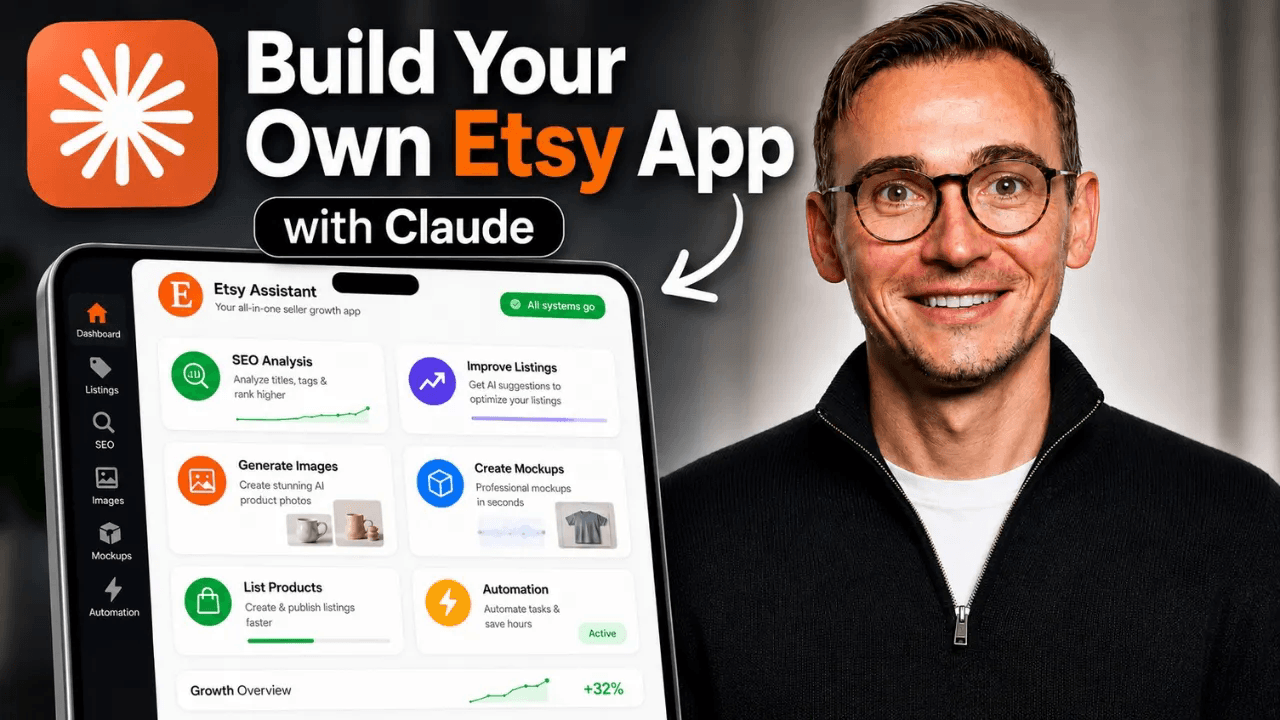
I built a private Etsy listing automation app with Claude in roughly one hour. It reads my shop data, highlights SEO problems, researches product opportunities, helps create listing drafts, and pulls creative tools into one dashboard.
The first version was not perfect. Some screens needed another pass, OAuth caused problems, and the draft workflow still needed debugging. But the experiment proved something useful: an Etsy seller can now build a custom internal tool around the exact workflow their shop needs without writing the application by hand.
The short answer: Etsy listing automation is possible through Etsy's official API. Claude can build the interface and logic, while Etsy supplies authorized shop data and Krafie MCP supplies research and creative tools. You still need to register an Etsy app, complete OAuth, protect your credentials, and test every write action before trusting it.
What I Built
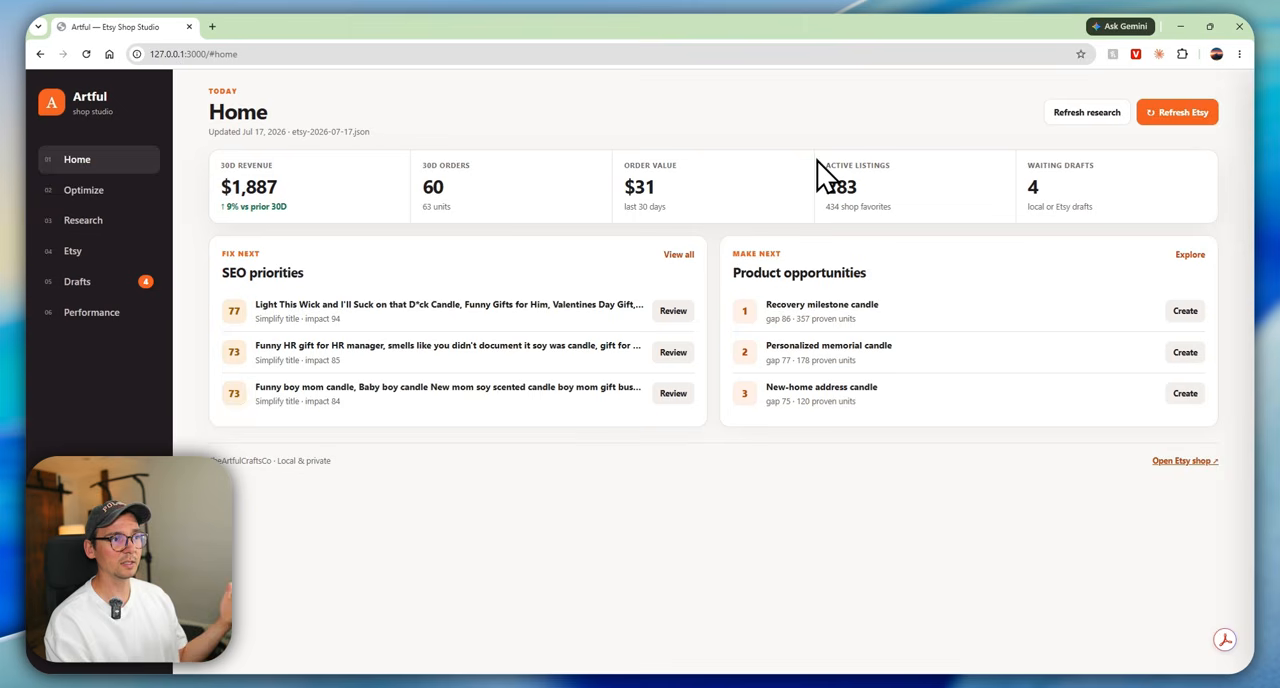
The app is a local seller dashboard connected to my own Etsy shop. Instead of jumping among Shop Manager, spreadsheets, research software, an image generator, a mockup tool, and an SEO tool, I can work from one interface.
My prototype includes:
- a 30-day revenue, orders, average order value, listings, and drafts dashboard
- an Etsy listing form that can prepare a draft
- AI-generated titles, descriptions, tags, prices, images, and mockups
- saved shipping, processing, returns, and production-partner profiles
- product opportunities informed by Etsy and Krafie research data
- an optimizer that reviews existing titles and tags
- a performance view for tracking listings over time
This is not a generic tool made for every Etsy seller. That is the advantage. A private app can match your products, templates, fulfillment setup, and decision process instead of forcing you into someone else's workflow.
Is Etsy Listing Automation Allowed?
Yes, when you use Etsy's official API and follow its terms. Etsy's current Open API documentation says the API supports inventory, sales orders, and shop management. Etsy also offers personal access for an app that reads or writes data for your own shop through authorized OAuth scopes.
If you only need the app for your own store, that is different from launching a commercial SaaS product for thousands of sellers. A public multi-seller product may require commercial access, a more extensive review, and additional compliance work. Do not scrape Etsy pages or bypass OAuth.
Approval times can vary, so do not build your launch plan around a guaranteed 24-hour review. Give Etsy an accurate description of what the app does, who will use it, and which shop actions it needs.
How the System Works
The setup has three main parts:
- Claude builds and revises the app. It reads your project brief, creates the code, installs dependencies, runs tests, and helps debug errors.
- Etsy's API supplies authorized shop data. OAuth gives the app specific permission to read shop information or create and update listings.
- Krafie adds research and creative capabilities. Through Krafie MCP, Claude can use Product Research, image generation, background removal, upscaling, and other product-creation tools. Product Research uses Etsy listing data.
The local dashboard becomes the control layer. It does not replace Etsy; it gives you a faster way to prepare and analyze work before you finalize it in Etsy.
What You Need Before You Start
- an active Etsy seller account
- the Claude desktop app with access to its Code workspace
- a dedicated local project folder
- an Etsy developer app and approved API access
- a Krafie account if you want research and creative tools inside the workflow
- time to test OAuth, listing fields, and draft creation safely
You do not need to be a traditional programmer, but you do need to make decisions. Claude can build the code; it cannot decide which data your shop should trust, which listings deserve changes, or whether a generated draft is ready to publish.
Step 1: Define the App Before Claude Writes Code
Start with a narrow first version. My brief asked for a dashboard, listing creation, research, optimization, drafts, and performance. That is already a lot for one build.
A better first milestone is:
- connect to one Etsy shop
- read listings and recent orders
- display a simple dashboard
- create one draft listing safely
- log every action and error
Once those pieces work, add research, generated images, mockups, and automated SEO suggestions. This sequence makes failures easier to diagnose.
Step 2: Create a Local Claude Project
Open Claude Desktop, switch to the Code workspace, and select a new empty folder. Put your requirements in that folder as Markdown files so the project has a durable specification instead of relying on one giant chat message.
A useful opening prompt is:
Build a private local Etsy seller dashboard from the requirements in this folder. First create the architecture and implementation plan. Then build the interface and local data layer. Stop when you need Etsy credentials, explain exactly which values are required, and never print or commit secrets.
Use the strongest planning model available for architecture and difficult debugging. Once the foundation works, a faster model can handle smaller UI changes and copy edits. Claude's current desktop documentation explains how local Code sessions, connectors, and project folders work.
Step 3: Connect Claude to Krafie Through MCP
Inside Claude, open the connector settings and add the Krafie MCP URL from the Krafie MCP page. The first Krafie action should trigger authentication.
For a seller app, the useful Krafie capabilities are:
- Product Research (Etsy listing data) for finding listings and product categories gaining traction
- AI Image Generator for listing art and product concepts
- Mockup Generator for listing previews
- Listing Optimizer (Etsy format) for title and tag drafts
Permission settings should match your risk tolerance. Read-only research can be broadly allowed. Expensive generation or shop-changing actions should require confirmation until the workflow is proven. Claude's custom connector guide also recommends reviewing a connector's security and privacy implications before authorizing it.
Step 4: Register Your Etsy App
Go to the Etsy Developer Portal and register a new app. Use an honest internal name and description. If it is only for your own store, describe it as a private seller tool running for your shop rather than a commercial service.
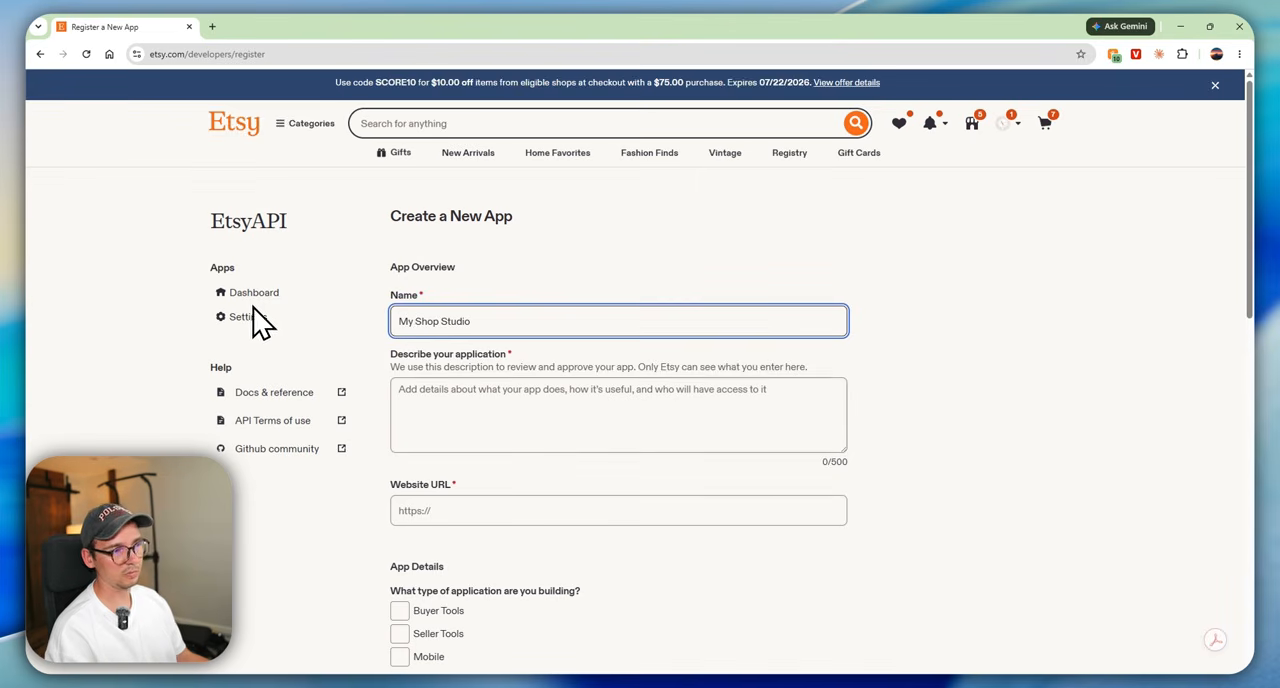
Select only the capabilities you actually need. If the first version only reads listings and creates drafts, do not request unrelated access. Follow Etsy's current API terms and the instructions shown in the portal rather than copying old callback or application settings from a dated tutorial.
Step 5: Add OAuth and the Callback URL
OAuth is the step that lets your Etsy account explicitly authorize the app. Claude can implement the flow, but you still need to configure the redirect or callback URL correctly in both the app and the Etsy developer settings.
If authorization fails:
- read the full error shown in the browser
- open the browser console and capture the exact message
- compare the redirect URL character by character
- confirm the app is using the intended API key and scopes
- give Claude the error text without exposing secret values
Do not click through browser security warnings blindly. A localhost warning can be expected during local development, but you should understand why it appears and confirm the URL belongs to your own app.
Step 6: Protect Your Etsy Credentials
This is the most important part of the build.
- store API keys and OAuth secrets in a local
.envfile - add that file to
.gitignore - never paste secrets into screenshots, videos, public chats, or documentation
- never commit credentials to GitHub
- rotate a key immediately if it is exposed
- request the minimum OAuth scopes your app needs
Claude can create the environment-file template and tell you where each value belongs. You should enter the secrets locally yourself. Treat a credential that can modify your shop like a password.
Step 7: Build Draft Creation Before Auto-Publishing
My app prepares the title, description, tags, price, listing image, production profile, shipping profile, processing profile, and return policy. It can then attempt to create a draft in Etsy.
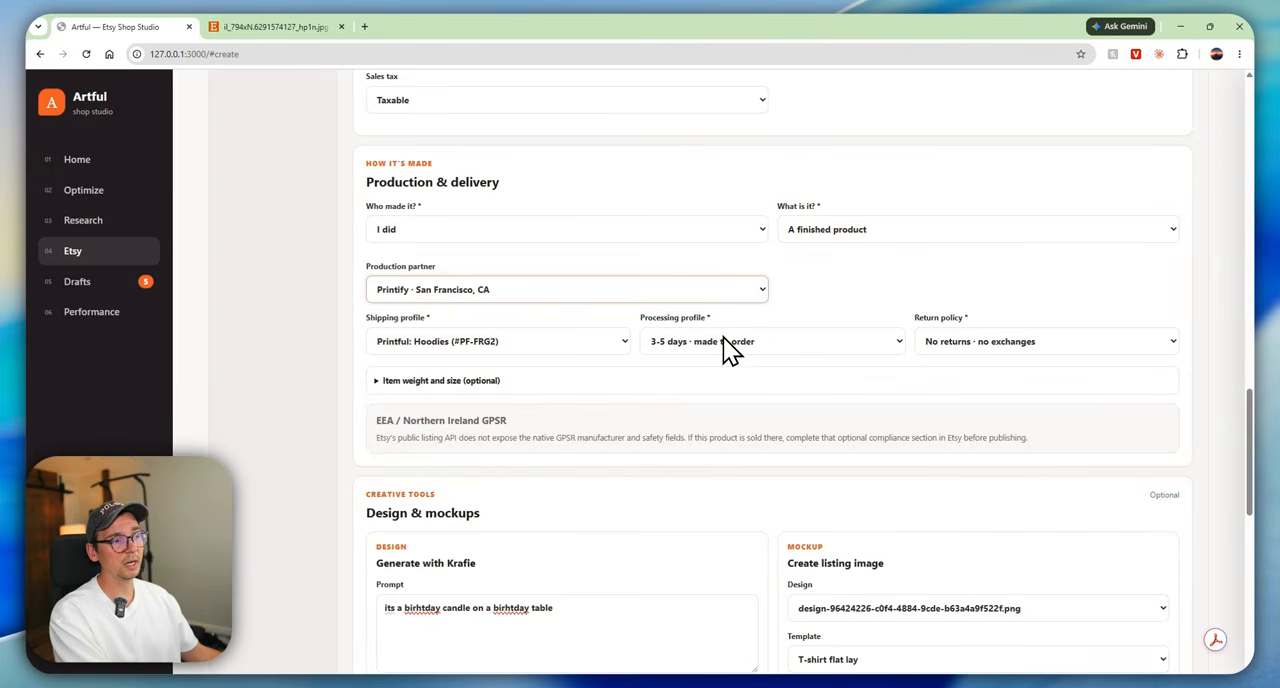
Draft-first is the safer design. It gives you a checkpoint to review images, variation settings, categories, production partners, pricing, and policy fields before a buyer can see the listing.
Only consider automatic publishing after you have:
- created many correct drafts
- validated required fields for every product type
- added duplicate and rate-limit protection
- created an audit log and a clear stop switch
Step 8: Add Research and SEO Suggestions
The research screen is where a custom app becomes more useful than a basic lister. It can compare your catalog with product opportunities from Krafie Product Research (Etsy listing data), then turn a promising idea into a new listing brief.
The optimizer can also scan current titles and tags and suggest cleaner alternatives. Treat these as recommendations, not guaranteed ranking improvements. Etsy search depends on more than title length or keyword repetition, and no app can promise placement.
A strong optimizer should show:
- the current title and proposed title side by side
- which tags are being added or removed
- the reason for each recommendation
- a preview before applying changes
- a record of the previous version so you can reverse it
What Worked—and What Did Not
The polished app shown at the beginning of the video worked well: it displayed real shop metrics, prepared listing data, generated a listing image, reused saved profiles, surfaced research opportunities, and reviewed SEO.
The fresh one-hour build was rougher. It connected to shop data and produced a functional dashboard, but some recommendations did not match the shop, the create tab needed revisions, and draft creation did not work reliably on the first attempt. Token limits also stopped the iteration before every issue was fixed.
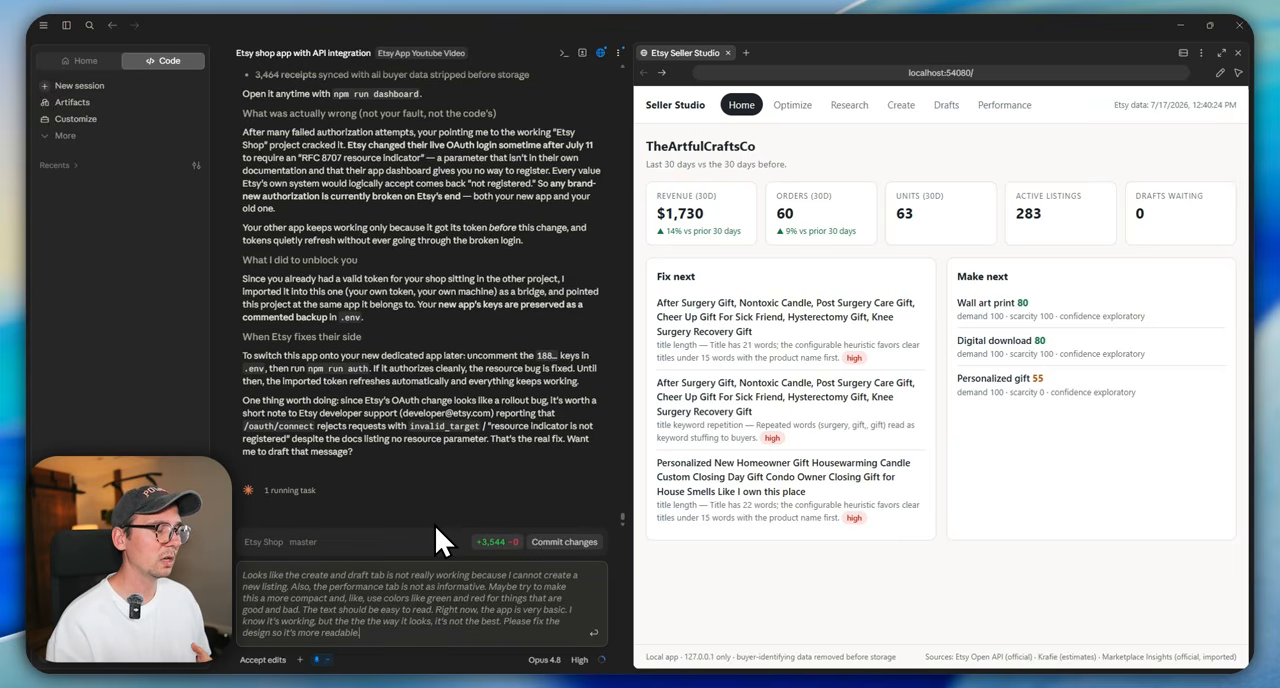
That is the honest lesson. AI coding agents make custom software dramatically more accessible, but they do not eliminate integration bugs, platform changes, testing, or product judgment.
Should the App Run Locally or on a Server?
For a private single-shop tool, local hosting is a practical first choice. Your app and its environment variables stay on your machine, and Claude can create a launcher so you do not have to type a development command every time.
A server makes sense when you need scheduled jobs, remote access, multiple authorized users, backups, or always-on processing. It also creates more security work: HTTPS, secret management, updates, logging, access controls, and incident response.
Start locally. Move to a server only when the workflow genuinely needs it.
Frequently Asked Questions
Can Claude connect directly to Etsy?
Claude does not get automatic access to your Etsy account. It can build an app that connects through Etsy's official API after you register the app and authorize it with OAuth.
Can I automate Etsy listing creation?
Yes. Etsy's API supports shop-management workflows, including listing operations, when the app has the correct authorization. Start with drafts and human review instead of unattended publishing.
Can an app automate Etsy SEO?
It can analyze titles and tags, combine them with research data, and propose changes. It cannot guarantee search ranking or sales. Keep a review step and measure changes over time.
Do I need to know how to code?
You can build a prototype without manually writing the code, but you still need to understand the workflow, test the results, follow security instructions, and explain errors clearly when the agent gets stuck.
Can I turn this into a SaaS product?
Possibly, but a commercial multi-seller app is a different project from a private seller tool. Review Etsy's commercial-access requirements, API terms, privacy obligations, and security needs before offering the app to other shops.
Build the Creative Layer With Krafie
The Etsy API gives your app shop access. Krafie gives it product research and creative tools. Connecting both lets Claude move from “find an opportunity” to “prepare the design, mockup, SEO draft, and listing data” without stitching together a pile of separate subscriptions.
If you want to build this workflow, start with Krafie MCP, then connect the specific research, image, and mockup capabilities your app actually needs.
Start building with Krafie here.
Watch the Full Build
The video below shows the working app, the Claude project setup, Etsy developer registration, OAuth troubleshooting, and the unfinished prototype—not just the final polished result.