

Most people still use ChatGPT like a smarter search box: ask a question, copy the answer, and close the tab.
ChatGPT Work becomes far more useful when it can work with real files, business data, connected tools, and repeatable instructions. That is when it starts acting less like a chatbot and more like an operating layer for your business.
I use this approach across Etsy stores, Krafie, YouTube, sponsorships, TikTok Shop, and custom software. Here are the systems that save me the most time.
ChatGPT Work vs. Codex
I use ChatGPT Work when the output is research, analysis, writing, or coordination. I use Codex when the output needs to be functioning software.
- market and competitor research
- reports and daily briefs
- articles and content planning
- multi-step business workflows
- building websites and apps
- API integrations
- testing and debugging
- working with repositories
A larger project can move between both. Work can research and define the system; Codex can build and verify it.
1. Building an Etsy Store System
My Etsy workflow begins with evidence, not random prompts. The agent looks for listings with recent momentum, extracts broad demand signals, and organizes the strongest opportunities.
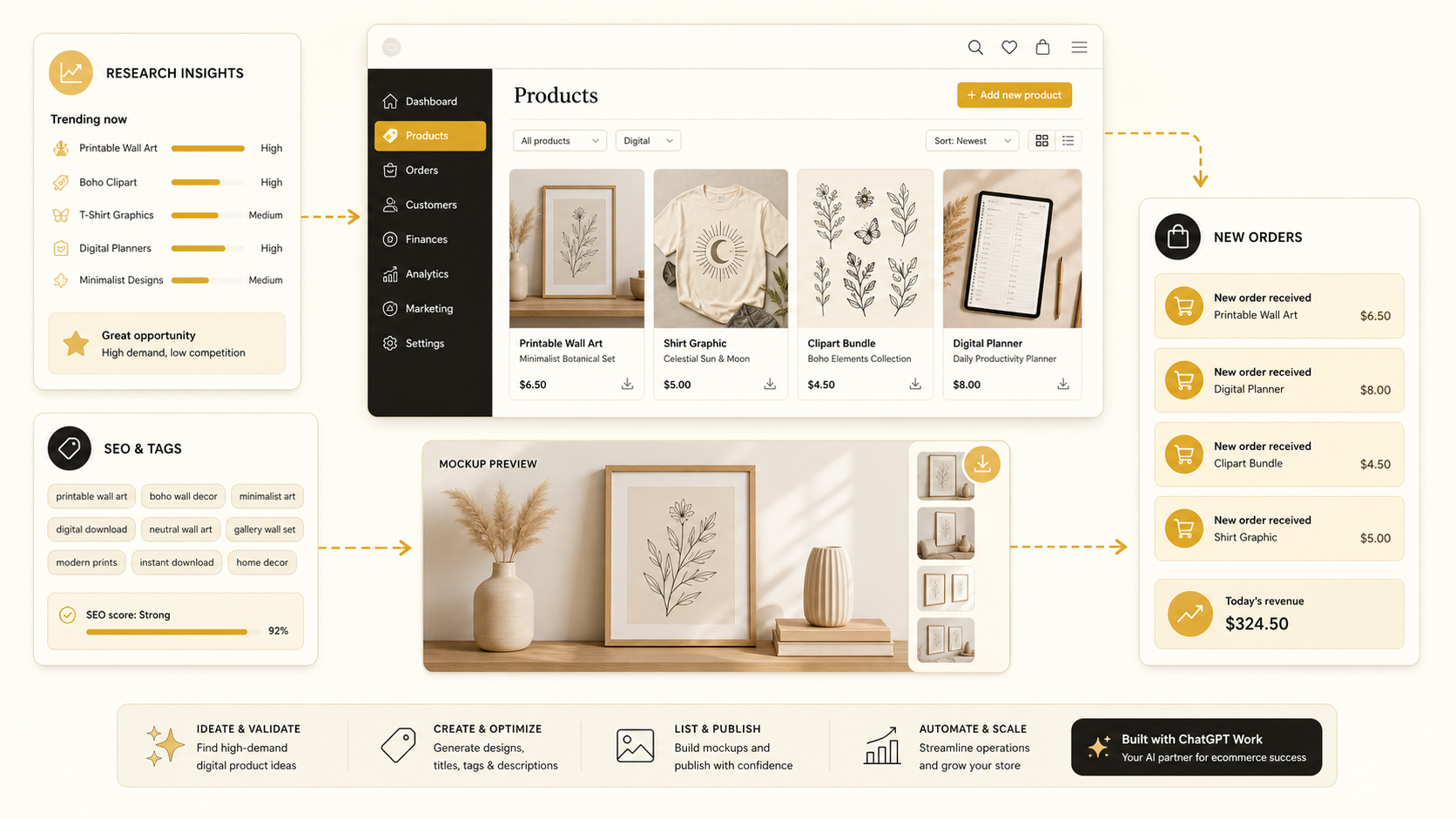
Through the Krafie MCP connection, the workflow can use Product Research (Etsy listing data), the AI Image Generator, Background Remover, and Mockup Generator.
Research, first-pass concepts, cleanup, mockups, and organization.
Originality, brand fit, pricing, final files, and the live listing.
For the complete product stack, read How to Use Krafie to Generate and Sell Digital Products.
2. Making TikTok Shop AI Videos
Short product videos are repetitive by nature. Once a format works, an agent can reuse its structure across approved products without recreating the process from scratch.

My workflow receives product references, follows a saved creative format, generates text-free clips through the Krafie Video Studio, and saves the results for review.
I still select the offer, verify that the product is represented accurately, add native text and sound, follow disclosure rules, and post from the platform. AI handles production; I keep control of the sale.
3. Building Websites From a Brief
A website project becomes much faster when the agent receives a clear audience, goal, visual direction, required sections, and examples of what “finished” means.

ChatGPT Work can research the audience and produce the brief. Codex can turn that brief into a working page, run the project, test responsive layouts, and fix implementation problems.
The best results come from milestones: first structure, then styling, then functionality, then visual QA. “Build me a website” is too vague; a testable sequence is not.
4. Vibe Coding Custom Software
I built much of Krafie with AI-assisted development even though I am not a traditional full-time software engineer.

My process is simple: describe the user and problem, plan the architecture, review security and data assumptions, let Codex implement one milestone, and test it before adding more.
5. Turning YouTube Videos Into SEO Blog Posts
I do not want to rewrite every video for search. My publishing system turns one source video into a more skimmable article instead.

The workflow cleans the transcript, checks search intent, finds content gaps, chooses a title and slug, writes a structured article, creates images, adds internal links, embeds the source video, and prepares the post for review.
This article came from that system. The video remains the original experience; the post becomes a searchable reference with clearer steps and more visual context.
6. A Daily Email and Sponsorship Brief
A daily brief scans the connected context I allow and summarizes customer issues, sponsor conversations, deadlines, and replies that need my attention.
The safest version stops at a draft. It shows the source conversation, proposes a response, and leaves the message unsent until I approve it.
7. Private Analytics for Better Decisions
Etsy and other platforms do not always answer the questions I care about. Codex can build a small local dashboard around my own data and calculations.
For example, a dashboard can identify top product themes, flag weak titles, combine shop performance with market research, and suggest what deserves a closer look. The recommendations are useful, but I still verify the data and decide what changes reach customers.
What the Businesses Earn
In the source video, I share approximate monthly ranges from my own businesses:
Print-on-demand Etsy shop
Digital product Etsy shop
Krafie software business
YouTube sponsorships
TikTok Shop affiliate activity
These are personal estimates, not guaranteed outcomes, and they are not all profit. The businesses existed before these automations and still require costs, maintenance, judgment, and review.
How to Build Your First Automation
- Choose one repeated task. Start with a brief, report, research job, or content checklist—not “run my business.”
- Define the input and output. Name the exact files, apps, destination, quality checks, and exclusions.
- Add an approval point. Publishing, sending, spending, deleting, and changing live data should wait for you.
- Connect the minimum tools. Give the workflow only the access it needs.
- Run it manually first. Watch several complete runs and record failure points.
- Make the proven version reusable. Save the steps, templates, checks, and tool order as a skill or scheduled process.
A Copy-and-Paste Starter Prompt
I want to automate one repeated business task.

Task: [describe the task]
Frequency: [daily, weekly, or on demand]
Allowed inputs: [files, folders, apps, links, or APIs]
Required output: [exact deliverable and destination]
Quality checks: [what must be true before completion]
Never do without approval: [publishing, sending, deleting, spending, or changing live data]

First inspect the available context. Then create an implementation plan with the required tools, credentials, risks, failure recovery, and verification checklist. Do not take external actions yet. Wait for my approval.
Rules I Would Not Skip
- Use dedicated folders and least-privilege access.
- Keep credentials in approved secret storage, never inside public prompts or files.
- Back up live content before an automated update.
- Log the inputs, outputs, and decisions you may need to audit later.
- Set usage limits for research, premium reasoning, and AI video generation.
- Validate accuracy, originality, links, formatting, and policy compliance before publishing.
Related Krafie Guides
Use these focused guides to turn one part of the system into a repeatable workflow.



Final Thoughts
ChatGPT Work is most powerful when it is attached to a real process—not when it is asked for random ideas.
Start with one job you understand. Give it the right context. Define what “done” means. Keep approval where judgment matters. Test the process, then make it reusable.
If your workflow needs digital product creation, product research, mockups, image cleanup, or AI video, start creating with Krafie and connect the specialized tools your agent needs in one place.
The goal is not to remove yourself from the business. It is to remove the repeated work that keeps you from improving it.